
ESP32 · Architecture
Architecture: ESP32 2.5D Face Rig
Overview
The ESP32 robot face can be drawn two ways. Classic is the original
renderer covered in ESP32 Parametric Face Animation:
FaceState floats fed to independent eye, brow and mouth primitives, each
feature its own shape. 3D is a different technique entirely — the eyes and
mouth are decals painted on an invisible ellipsoid, rotated in three axes and
projected onto the panel every frame.
It is called 2.5D rather than 3D because there is no mesh, no depth buffer and no lighting. There is one implicit surface, and every facial landmark is a point on it. That single decision is what makes a head turn read as a head turning rather than as shapes sliding sideways.

Scene tables      what the character performs
    │             sample(id, elapsed, seed) -> Pose
    ▼
Player            phase tracking + interruption blending
                   Collection: manual / ambient / cue arbitration
    │             pose(now) -> Pose
    ▼
Rig               Pose (42 channels)
                   Projection: ellipsoid + yaw/pitch/roll + perspective
                   polygon(): scanline fill -> span(x, y, len)
    │
    ▼
Canvas            panel-native pixel layout + details and effects
    │
    ▼
Display driver    the buffer reaches the OLED
The two renderers coexist. Selecting one is a user setting, and neither knows about the other.
Why an Ellipsoid
The projection at the heart of the system is nine lines. Given a landmark in flat face-local coordinates it:
-
Applies a squash-and-stretch preconditioning to the input.
-
Lifts the point onto an ellipsoid, solving for depth:
z = -36 * sqrt(max(0.05, 1 - x^2/80^2 - y^2/72^2))Half-axes 80 by 72 by 36. The clamp at
0.05keeps the square root real for landmarks that stray outside the ellipse rather than letting them vanish. -
Rotates that 3D point by yaw, then pitch, then roll.
-
Divides by depth for perspective:
scale = 144 / max(100, 180 + z). -
Offsets into screen space at the panel's centre, plus a small shift and lift.
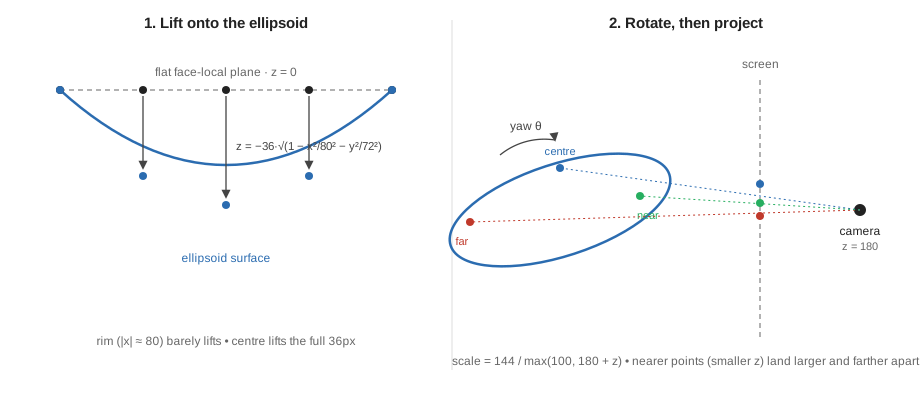
In short: a flat landmark is not moved, it is dressed onto a ball and then photographed. Rotating the ball and re-photographing it is what makes the far side shrink and the near side spread — the same reason a real head's far cheek recedes when it turns.
Because every landmark goes through the same matrix, the eyes, the lids and the mouth all rotate as one solid. Nothing needs to be told how to foreshorten; it falls out of the projection. An earlier hand-rolled attempt at this effect got it wrong by translating both eyes an equal distance and narrowing only one — that is not what rotation does.
Deformation Happens Before Projection
The eye outline is built from thirty-two points in local space, with the lid, slant, squint and pinch shaping applied to those local points, and only then is each point projected. Clipping happens locally, before projection, so lids tilt too.
Close an eye on a head tilted 30 degrees and the lid line tilts with the head. Had the lid been a black rectangle painted over the finished pixels, it would stay stubbornly horizontal instead.

Rasterisation, and Why There Are No Bitmaps
The rasteriser is an even/odd scanline fill evaluated at pixel centres
(y + 0.5), with a bounded scratch array and insertion-sorted crossings. It
never allocates. It emits horizontal runs to a sink: span(x, y, length).
Even/odd means: walk a scanline left to right, and every time you cross the polygon's outline, flip between "outside" and "inside". A star-shaped outline crossed near its points gives one span; crossed through its legs gives two, with a gap between them where the notch is:
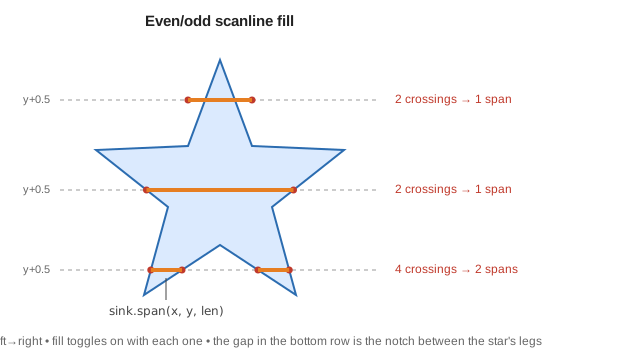
That one-method interface is the seam that makes the whole thing testable. The firmware sink stores pixels in the OLED's native page layout so the finished buffer can be copied straight into the display. The host preview tool uses the same rasteriser. The preview is not an approximation of the device output — it is the same code producing the same bytes.
A second sink exists for the clock eyes: one that writes zeros instead of ones, used to hollow the dial out of the eye. Same polygon routine, inverted ink.
The Pose: 42 Channels
The Pose structure carries everything a frame needs — orientation (yaw, pitch, roll), gaze, per-eye geometry, mouth shape, and effect intensities (sweat, snow, cracks, hand, spiral, clock, and more).
Blending walks an explicit table of the structure's fields rather than treating it as a raw array of floats:
for each channel in CHANNELS:
    result[channel] = a[channel] + (b[channel] - a[channel]) * k
This is a deliberate departure from the Classic FaceState, which does walk
itself as a contiguous float array and needs a compile-time layout check to
stay safe. The 3D Pose pays one line per channel and gets defined, checked
behaviour in exchange. The trade-off: FaceState picks up new fields
automatically, while a new Pose channel that is not added to the explicit
table will silently fail to blend.
Motion: Authored, Not Simulated
Every value in the scene tables is in seconds, pixels or radians, and every
performance is a table of Motion rows:
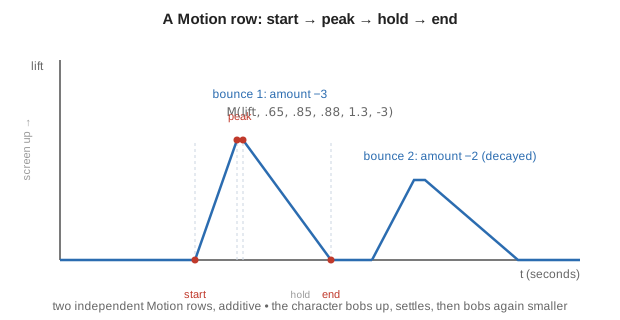
Motion { channel, start, peak, hold, end, amount }
Each row drives one channel through a trapezoid: rise from start to peak,
hold until hold, fall to end. Rows accumulate additively, so a scene is a
stack of overlapping envelopes rather than a keyframed pose sequence.
For example, the Happy scene's bounce is two rows on the same channel:
M(lift, .65, .85, .88, 1.3, -3)   // bob up
M(lift, 1.5, 1.7, 1.75, 2.2, -2)  // and again, smaller
Two things in that excerpt are the whole philosophy. The paired lift rows
are a decaying bounce written by hand rather than simulated. Elsewhere the
same scene pairs two stretch rows for anticipation followed by
overshoot — the character compresses slightly before it rises.
Easing Is Minimum-Jerk
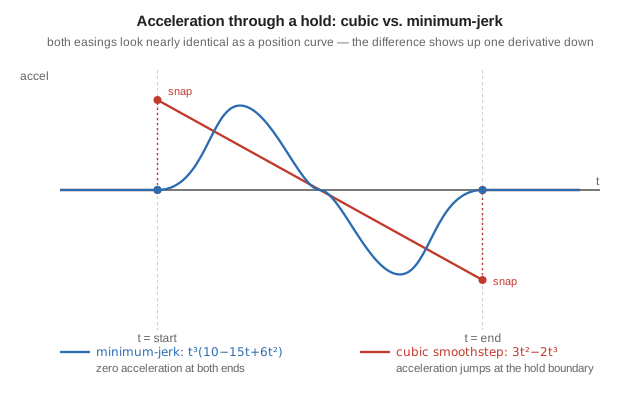
ease(t) = t^3 * (10 - 15t + 6t^2)
The quintic smoothstep, with zero velocity and zero acceleration at both ends. Cubic easing only zeroes velocity, which leaves a visible acceleration snap at each hold. At this scale — a 36-pixel eye on a 128 by 64 panel — that snap is the difference between "animated" and "mechanical".
As a position curve the two easings look almost the same S-shape; the difference only shows up one derivative down. A hold sits at zero acceleration on both sides of a move. Cubic easing arrives at the move with nonzero acceleration, so there is a sudden jump — a snap — right where the hold meets the move. The quintic's acceleration tapers to zero on both sides, so there is nothing to jump:
Procedures: What Tables Cannot Express
A small set of per-scene procedures adds code for things an envelope cannot say: mouth chatter for speech, shivering for cold, spray particles for a sneeze. They are closed-form functions of elapsed time, never accumulators, so a dropped frame changes nothing.
The shared damped-oscillation shape used for hiccups and taps:
impulse(t) = strength * 24 * d^2 * e^(-8d) * sin(19d) * (1 - ease(d))
where d is time since the impulse began. The d^2 prefix starts it from
rest, the exponential decays it, and the (1 - ease(d)) gate forces it to
exactly zero at d = 1 — so the effect ends cleanly instead of being
truncated mid-wobble.
Nothing Is Ever Perfectly Still
Every scene gets a breathing bob, and every looping scene gets an idle blink at a seed-derived time, both scaled by an "alive" envelope that fades in over 0.4 seconds and out before the loop end, so a looping scene rejoins its own start at rest. The auto-blink is suppressed for the Merge, Clock, Sleepy and Dizzy scenes — scenes that either own their lids or would have their silhouette broken by one.
Interruption: The Part That Is Genuinely Hard
Cutting from one scene to another mid-motion is where most character systems show a seam. The player avoids it by recording, at the moment of the switch, both the positional error and the velocity error between the old and new performances, estimated by sampling both scenes one millisecond apart. The two errors are then decayed over 420 milliseconds with Hermite basis functions that reach zero with zero slope. The result is that the character's position and its motion are continuous through a cut, and it converges onto a target that is itself still moving.
The new scene is not something that starts at the cut — it exists the whole time as a table of numbers, the character simply was not showing it. Cutting to it naively would jump both position and slope. Instead the output leaves from exactly where the old scene was, moving at exactly the speed it was moving, and bends over 420 milliseconds onto the new scene's own moving position and speed:
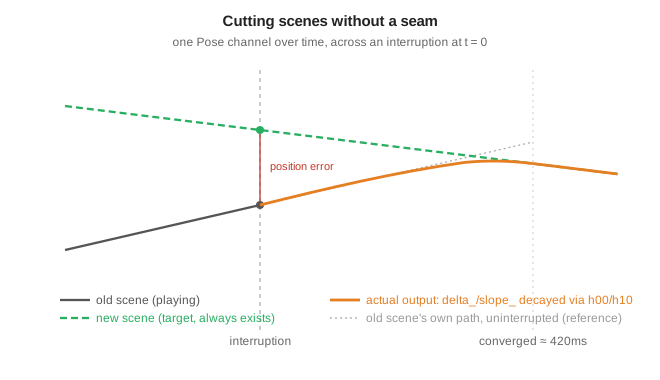
One channel is excluded by hand from the velocity estimate: effect phase, because it wraps at a loop boundary. Differencing across that wrap would report a velocity of thousands of units per second and fire every particle effect at once.
Arbitration: Manual, Ambient, Cue
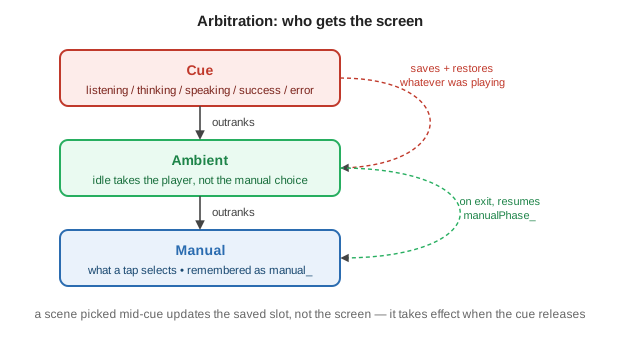
Scene selection layers three sources of intent, and the ordering rules are the behaviour worth knowing:
| Source | Rule |
|---|---|
| Manual | What a tap selects. Remembered independently of what is on screen. |
| Ambient | Idle takes over playback but does not overwrite the manual choice; the manual phase is stashed so leaving ambient resumes the exact frame. |
| Cue | Voice states — listening, thinking, speaking, success, error. Outranks both. |
Cues save whatever was playing and its phase, then restore it on release. Success and error expire on their own timers (1200ms, 1800ms). Re-notifying the same cue is a no-op, so a repeated "still thinking" signal does not restart the animation.
Selecting a scene while a cue is active updates the saved slot rather than the screen, so the choice takes effect when the cue lets go.
Preview and Verification
A preview tool renders scenes through the same rasteriser and emits a gallery, native-resolution GIFs and contact sheets, with no imaging or browser dependency. Because it drives the real rasteriser, an animation can be judged before it is flashed to the device — the workflow lesson that produced this rig in the first place.
Preview clock faces use explicitly labelled fixture data; the firmware never invents a time it does not have from the network. Host test suites cover projection, loop continuity, gaze lead, blinks, bounds, determinism, interruption, persistence and selection, separately from a check that renders the Classic path off-device to guard it against regression from 3D work.
What the Tests Do Not Cover
Host checks verify geometry and timing arithmetic. They say nothing about whether the animation looks right, and nothing about real frame pacing on the panel — a full frame buffer transfer over I2C at 400kHz costs roughly 25ms, which caps the achievable rate near 30fps regardless of how fast a frame is computed. Both remain matters for looking at the device.
Referenced Files
The paths and symbols below are reported by the source document. The firmware repository is not part of this documentation workspace.
| Path | Responsibility |
|---|---|
Robot_Face_Pro/Rig3D.h | Pose, ellipsoid projection, polygon fill, eye construction, render, head-turn track |
Robot_Face_Pro/Render3D.h | Canvas, clock dials, spiral, tongue, sweat, snow, stars, fog, cracks, hand |
Robot_Face_Pro/Player3D.h | Interruption blending; manual/ambient/cue arbitration |
Robot_Face_Pro/Scenes3D.h | Scene IDs, Motion tables, scene registry, sampling, procedures |
Robot_Face_Pro/HeadTurn.h | Compatibility shim over the ellipsoid rig |
Robot_Face_Pro/FaceStyle.h | Style enum and the storage-agnostic preference policy |
Robot_Face_Pro/FacePreferences.cpp | Persisted storage for that policy |
Robot_Face_Pro/FaceEngine.cpp | Style switching, ambient and cue routing |
tools/preview_collection.py | Exact-pixel gallery, GIFs and contact sheets |
test/test_collection3d.cpp | Scene, interruption, persistence and selection coverage |
test/test_head_turn.cpp | Projection, tracks, blinks, bounds, determinism |
| ESP32 Parametric Face Animation | The Classic renderer this rig coexists with |