
ESP32 · 02-face
Architecture: The 2.5D Face Rig
Note: This document was generated by an AI agent.
Overview
The character can be drawn two ways. Classic is the original renderer: FaceState floats fed to the eye, brow and mouth drawing primitives, each feature an independently sized shape. 3D is a different technique entirely — the features are decals painted on an invisible ellipsoid, rotated in three axes and projected to the panel every frame.
It is called 2.5D rather than 3D because there is no mesh, no depth buffer and no lighting. There is one implicit surface, and every facial landmark is a point on it. That single decision is what makes a head turn read as a head turning rather than as shapes sliding sideways.

Data flows in one direction: a scene's motion tables are sampled into a pose, a player blends and arbitrates between competing scenes (manual selection, ambient idling, voice cues), the pose is projected through the ellipsoid and rotation math into filled outlines, and the result is composited onto a canvas with its overlay effects before being copied into the display buffer.
The two renderers coexist. Selecting one is a user setting, and neither knows about the other.
3D playback runs at 78% of its authored speed. The runtime scales both the authored clock and scene duration, preserving each performance's internal rhythm while matching the brisker legacy expression pacing. Classic timing remains unchanged.
The information panels use the same 128x64 discipline. The screen layer presents a single focused header with one icon, the current title, a page indicator and connection state. The content begins below one divider, avoiding clipped neighboring tab labels and leaving the body readable at native size.
Why an ellipsoid
The projection function is the heart of the whole system, and it is nine lines. Given a landmark in flat face-local coordinates it:
- Applies stretch as a squash-and-stretch preconditioning of the input.
- Lifts the point onto an ellipsoid, solving for depth. Half-axes are 80 x 72 x 36. The clamp at 0.05 keeps the square root real for landmarks that stray outside the ellipse rather than letting them vanish.
- Rotates that 3D point by yaw, then pitch, then roll.
- Divides by depth for perspective:
scale = 144 / max(100, 180 + z). - Offsets into screen space at (64, 32), plus shift and lift.
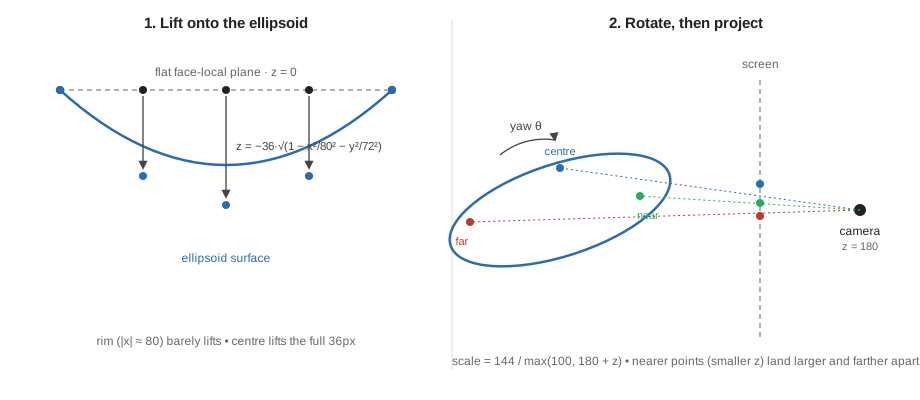
The projection, written out
Nine lines, and every one of them is doing something. Squash-and-stretch, then the ellipsoid lift, then yaw, pitch and roll in that fixed order, then the perspective divide and screen offset — all six steps run in sequence inside one function, walked through below.
Step 2 is the ellipsoid. Rearranging the standard equation
x²/a² + y²/b² + z²/c² = 1        with a = 80, b = 72, c = 36

z = -c · sqrt(1 - x²/a² - y²/b²)
The sign is negative because the camera looks along +Z and the visible surface is the near one. The floor of 0.05 keeps the root real for a landmark that strays outside the ellipse — the hand and the effect emitters do — so they flatten against the rim instead of vanishing into NaN.
Steps 3–5 are three rotations, applied in a fixed order, each the ordinary 2×2 rotation acting on a pair of axes:
| Step | Rotates | Acts on |
|---|---|---|
| yaw | about Y | (x, z) |
| pitch | about X | (y, z) |
| roll | about Z | (x, y) |
Note that the yaw sign is flipped once, in the setup step, rather than negated at each use.
Step 6 is weak perspective, and the two magic numbers are a camera:
scale = f / (d + z)      f = 144 (focal length), d = 180 (camera distance)

at z = 0     144 / 180       = 0.800
at z = -36   144 / 144       = 1.000     the nose, 25% larger
at z = +36   144 / 216       = 0.667     the back of the head, were it drawn
A floor of 100 guards the divide: without it a pose that pushed a landmark behind the camera would divide by something near zero and fling it off-screen.
Foreshortening falls out of this, unasked. Rotate by yaw and a landmark at
face-local x moves to x·cos(yaw) + z·sin(yaw) — and because z is itself a
function of x, the far side both compresses and recedes into a smaller
perspective scale. Nobody wrote a foreshortening rule. It is the arithmetic.
In short: a flat landmark is not moved, it is dressed onto a ball and then photographed. Rotating the ball and re-photographing it is what makes the far side shrink and the near side spread — the same reason a real head's far cheek recedes when it turns.
Because every landmark goes through the same matrix, the eyes, the lids and the mouth all rotate as one solid. Nothing needs to be told how to foreshorten; it falls out of the projection. This is the part an earlier hand-rolled attempt got wrong by translating both eyes an equal distance and narrowing only one — that is not what rotation does.
Deformation happens before projection
Building an eye outline constructs a 32-point rounded-rectangle in local space, then applies the lid, slant, squint and pinch to those local points, and only then projects each one. The reasoning is direct:
Clipping happens locally BEFORE projection, so lids tilt too.
Close an eye on a head tilted 30 degrees and the lid line tilts with the head. Had the lid been a black rectangle painted over the finished pixels — which is how the Classic renderer does it — it would stay stubbornly horizontal.

The pose: 41 channels
Compare this with the Classic renderer's blending, which casts its struct to a flat float array and walks it. This one uses a table of pointer-to-member, and the comment says why: never reinterpret the struct as an array. Pose has 41 channels that are not all conceptually alike, and a member added to the struct but forgotten in the channel list is a channel that silently never animates — a bug the compiler cannot catch either way, but one that stays findable when the list is explicit.
| Group | Channels | |
|---|---|---|
| Head orientation | 3 | yaw pitch roll |
| Gaze and body | 4 | gazeX gazeY lift stretch |
| Eye shape | 9 | lidL lidR smile widthL widthR heightL heightR radius spread |
| Eye detail | 3 | pinch squint slant |
| Mouth | 4 | mouthWidth mouthOpen mouthY mouthVisible |
| Framing | 2 | shift scale |
| Set-piece effects | 16 | spiral tongue sweat snow stars fog wipe cracks hand handX handY ripple spray emitX emitY phase |
Sixteen of the 41 are effects. The rig is mostly a face and substantially a special-effects system.
Rasterisation, and why there are no bitmaps

Drawn by the same even-odd rule and the same rounding the firmware uses, so these are the pixels the panel would light.
The polygon fill is an even/odd scanline fill evaluated at pixel centres (y + 0.5), with a bounded 64-entry scratch array and insertion-sorted crossings. It never allocates. It emits horizontal runs to a sink.
Even/odd means: walk a scanline left to right, and every time you cross the polygon's outline, flip between "outside" and "inside". A star-shaped outline crossed near its points gives one span; crossed through its legs gives two, with a gap between them where the notch is:
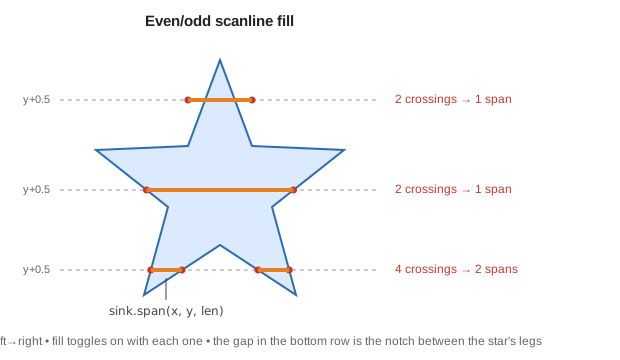
That one-method interface is the seam that makes the whole thing testable. The firmware sink is a canvas type that stores pixels in the SSD1306's native page layout so the finished buffer can be copied straight into the display. The host preview uses the same canvas type. The preview is not an approximation of the device output — it is the same code producing the same bytes.
Clock faces are intentionally outside the procedural 3D collection. The panel and classic renderer remain responsible for live clock visuals.
The Pose: 41 channels
Pose carries everything a frame needs — orientation (yaw, pitch, roll), gaze, per-eye geometry, mouth shape, and effect intensities (sweat, snow, cracks, hand, spiral, tongue, …).
Blending walks an explicit table of pointer-to-members. The header is blunt about why:
Defined C++ member traversal; never reinterpret the struct as an array.
This is a deliberate departure from FaceState, which does walk itself as a float array and needs a static_assert plus a test to stay safe. Pose pays one line per channel and gets defined behaviour in exchange. Note the trade-off: FaceState picks up new fields automatically, while a new Pose channel that is not added to the channel list will silently fail to blend.
Easing: why a quintic
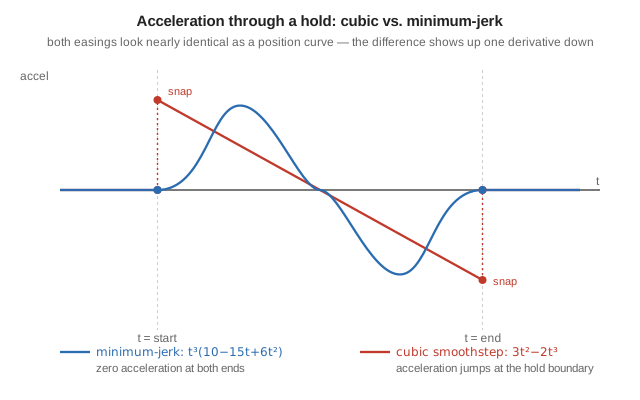
Every keyframe track in the rig is interpolated through one function: a quintic with zero velocity and acceleration at each hold.
That is 10t³ − 15t⁴ + 6t⁵, and the comment claims something specific. It is
worth checking, because the obvious alternative — the cubic smoothstep
3t² − 2t³ used everywhere in graphics — also stops at each end.

quintic  f(t)   = 10t³ − 15t⁴ + 6t⁵
         f'(t)  = 30t²(1 − t)²            f'(0) = 0,   f'(1) = 0
         f''(t) = 60t(1 − t)(1 − 2t)      f''(0) = 0,  f''(1) = 0

cubic    f(t)   = 3t² − 2t³
         f'(t)  = 6t(1 − t)               f'(0) = 0,   f'(1) = 0
         f''(t) = 6 − 12t                 f''(0) = +6, f''(1) = −6
Both curves have zero velocity at each end — both come to rest. Only the quintic has zero acceleration there too.
The cubic's acceleration jumps from nothing to +6 in an instant at the start
of every segment, and to −6 at the end. That discontinuity is jerk, the
third derivative, and the eye reads it as a tick at the boundary. One tick is
imperceptible. A nine-and-a-half-second performance whose yaw track alone has
fourteen keyframes, with pitch, roll, gaze and stretch tracks alongside, has
a great many boundaries — and the ticks accumulate into something that reads as
mechanical rather than alive.
Minimum-jerk is also, not coincidentally, the profile human reaching movements actually follow. Borrowing it is why the head-turn looks like a head turning rather than a value being interpolated.
Motion: authored, not simulated
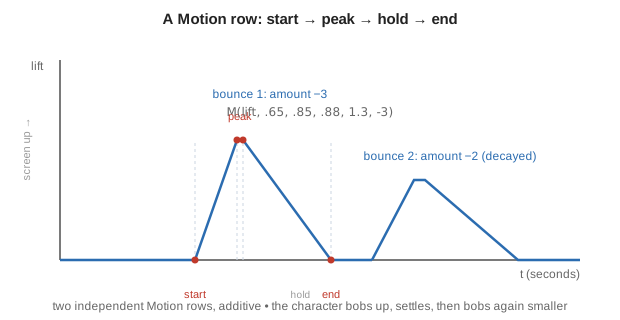
Every value in the scene tables is in seconds, pixels or radians, and every performance is a table of Motion rows. Each row drives one channel through a trapezoid: rise from start to peak, hold to hold, fall to end. Rows accumulate additively, so a scene is a stack of overlapping envelopes rather than a keyframed pose sequence.
A performance is authored as a list of these rows. In the happy scene, for example: a smile row and a squint row rising together, two separate lift rows placed one after another so the second, smaller bump reads as a decaying bounce, and a pair of stretch rows — one that squashes briefly as anticipation, immediately followed by one that stretches as overshoot.
Two things in that excerpt are the whole philosophy. The paired lift rows are a decaying bounce written by hand rather than simulated. The paired stretch rows are anticipation followed by overshoot — the character compresses slightly before it rises.
Easing is minimum-jerk
The quintic smoothstep, with zero velocity and zero acceleration at both ends. Cubic easing only zeroes velocity, which leaves a visible acceleration snap at each hold. At this scale — a 36px eye on a 128x64 panel — that snap is the difference between "animated" and "mechanical".
As a position curve the two easings look almost the same S-shape; the difference only shows up one derivative down. A hold sits at zero acceleration on both sides of the move. Cubic easing arrives at the move with nonzero acceleration, so there is a sudden jump — a snap — right where the hold meets the move. The quintic's acceleration tapers to zero on both sides, so there is nothing to jump:
Procedures: what tables cannot express
A Procedure adds per-scene code for things an envelope cannot say: mouth chatter for speech, shivering for cold, spray particles for a sneeze. They are closed-form functions of t, never accumulators, so a dropped frame changes nothing.
A shared damped-oscillation shape is used for hiccups and taps: it starts from rest, decays exponentially, oscillates through a sine term, and is gated to force it to exactly zero at the end of its window — so the effect ends cleanly instead of being truncated mid-wobble.
Nothing is ever perfectly still
Every scene gets a breathing bob, and every looping scene gets an idle blink at a moment derived from a per-scene seed, so it lands at a different point in each loop rather than always the same instant.
Both are multiplied by an alive envelope that fades in over 0.4s and out before the loop end, so a looping scene rejoins its own start at rest. The auto-blink is suppressed for the merge, sleepy and dizzy scenes — scenes that either own their lids or would have their silhouette broken by one.
Interruption: the part that is genuinely hard
Cutting from one scene to another mid-motion is where most character systems show a seam. Switching scenes avoids it by recording, at the moment of the switch, both the positional error and the velocity error between the old and new performances.
Velocity is estimated by sampling both scenes 1ms apart. The two errors are then decayed over 420ms with the Hermite basis functions h00 and h10, which reach zero with zero slope. The result is that the character's position and its motion are continuous through a cut, and it converges onto a target that is itself still moving.
The new scene is not something that starts at the cut — it exists the whole time as a table of numbers, the character simply was not showing it. Cutting to it naively would jump both position and slope. Instead the output leaves from exactly where the old scene was, moving at exactly the speed it was moving, and bends over 420ms onto the new scene's own moving position and speed:
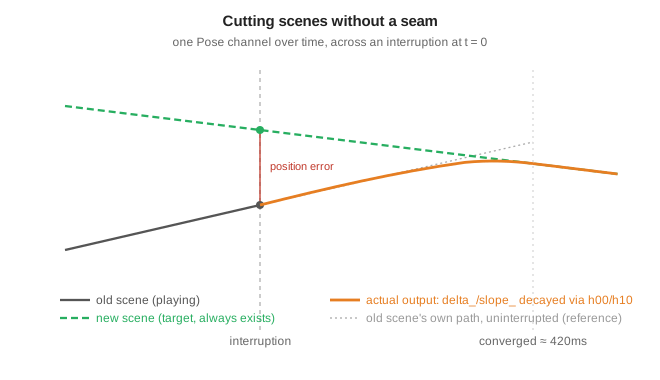
One channel is excluded by hand: phase is effect time, and it wraps at a loop boundary. Differencing across that wrap would report a velocity of thousands of units per second and fire every particle effect at once. The comment says so explicitly.
Arbitration: manual, ambient, cue
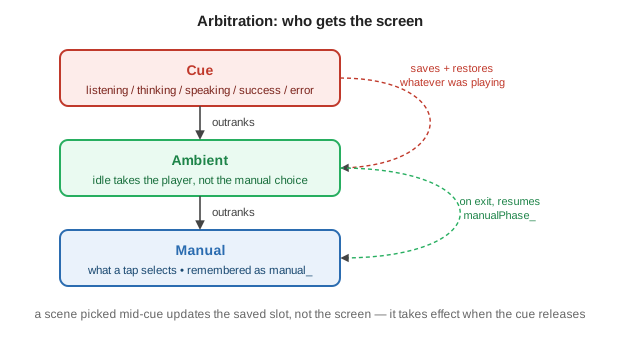
The collection layers three sources of intent, and the ordering rules are the behaviour worth knowing:
| Source | Rule |
|---|---|
| Manual | What a tap selects. Remembered as manual_. |
| Ambient | Idle takes over the player but does not overwrite the manual choice; manualPhase_ is stashed so leaving ambient resumes the exact frame. |
| Cue | Voice states (listening/thinking/speaking/success/error). Outranks both. |
Cues save whatever was playing and its phase, then restore it on release. Success and error expire on their own timers (1200ms, 1800ms). Re-notifying the same cue is a no-op, so a repeated "still thinking" signal does not restart the animation.
Selecting a scene while a cue is active updates the saved slot rather than the screen, so the choice takes effect when the cue lets go.
Selecting a collection
The face style setting is Classic or 3D, defaulting to 3D. The Setup tab gained a row to toggle it, and the choice persists in NVS storage.
The preference policy is deliberately storage-agnostic — it is templated on a generic store and lives in a header with no Arduino dependency, so the policy is host-testable while a separate module supplies the real storage calls. The policy is small but specific:
- Writing is skipped when the value already matches what was loaded.
- A failed store degrades to session-only rather than failing the switch: the style still changes, it just will not survive a reboot. The Setup screen reports which happened.
Preview and verification
A preview tool renders scenes through the same canvas type and emits a gallery, native-resolution GIFs and contact sheets, with no imaging or browser dependency. Because it drives the real rasteriser, an animation can be judged before it is flashed — which is the workflow lesson that produced this rig in the first place.
The 3D preview is deterministic and contains no clock scene. Clock faces remain available through the panel and classic renderer, where live time is still required before drawing a dial.
The scene registry supports explicit and automatic performances through the autoRotate flag. The creature and action comedy packs are currently enabled for automatic rotation, so tapping or demo playback reaches all twelve clips.
Host test suites — 4,407 checks for projection, loop continuity, gaze lead, blinks and bounds, and 218,708 checks for determinism, interruption, persistence and selection — cover the collection. A separate off-device render check guards the Classic path against regression from 3D work.
A debug logging option reports worst-case draw and I2C transfer microseconds over serial when enabled. It is off by default.
What the tests do not cover
Host checks verify geometry and timing arithmetic. They say nothing about whether the animation looks right, and nothing about real frame pacing on the panel — a full 1024-byte buffer over I2C at 400kHz costs roughly 25ms, which caps the achievable rate near 30fps regardless of how fast a frame is computed. Both remain matters for looking at the device.
Adding a performance
- Add a new scene identifier.
- Write a Motion table. Vary the dwells; equal beats read as mechanical.
- Register it with a duration, loop flag and Procedure. A compile-time check fails the build if an ID has no entry.
- Preview it before flashing.
Only reach for a new Procedure when the motion genuinely cannot be an envelope — periodic motion, particles, or anything needing per-frame state. Keep it a closed-form function of t.
If you add a Pose channel, add it to the channel list in the same edit. Nothing will warn you; it will simply refuse to blend or interpolate.
What a frame costs
The rig draws into its own canvas and then copies it into the display buffer, so its work sits entirely inside the ~8.3 ms the panel transfer leaves of each 33 ms frame — see the frame budget.
| Per frame | Work |
|---|---|
| Pose | 41 channel blends, plus track() over each keyframe table |
| Projection | One sqrtf and six trig multiplies per landmark; the trig itself is computed once per frame in the Projection constructor, not per point |
| Outlines | Up to 32 points per eye, projected individually |
| Fill | For each polygon, 64 scanlines × edge tests, insertion-sorted |
| Copy | memcpy of the 1,024-byte canvas |
| Transfer | 24.7 ms of I2C, which the CPU does not spend |
Two decisions keep this affordable. Caching the six sine and cosine values in the constructor means a 32-point eye outline costs 32 square roots, not 32 square roots plus 192 trig calls. And the polygon fill bounds its scratch at 64 intersections and refuses more than 64 vertices, so nothing on this path allocates or can grow.
If you need real numbers for your board, a debug logging option reports peak draw and peak transfer microseconds separately over serial every two seconds. Measure before optimising: the transfer is usually three times the draw.
Playing back at 78% of authored speed scales the authored clock and the scene duration together, so a performance keeps its internal rhythm while matching the brisker Classic pacing. It changes what you see, not what a frame costs.
Failure modes
| Symptom | Cause |
|---|---|
| A new channel never animates | It was added to Pose but not to CHANNELS[] |
| Landmarks vanish at extreme poses | The fmaxf(0.05f, …) guard under the square root was removed |
| A feature flies off-screen on a steep pose | The fmaxf(100, 180 + zz) divide guard was removed |
| Both eyes slide sideways instead of one shrinking | Landmarks are being translated rather than projected — the mistake this design exists to prevent |
| Lids stay horizontal on a tilted head | Clipping moved to after projection instead of before |
| Motion ticks at every keyframe | ease() replaced with a cubic smoothstep |
| A shape gains or loses a row as it drifts | Scanlines sampled at the row edge rather than at y + 0.5 |
| Host preview and hardware disagree by a pixel | Something bypassed Sink::span() and drew directly |
| The performance drifts out of sync over minutes | A secondary motion was integrated numerically instead of evaluated analytically from t |
Configuration reference
| Setting | Default | Meaning |
|---|---|---|
| Default face style | 1 | 0 is Classic, 1 is procedural 3D; Setup remembers later choices |
| 3D playback speed | 78% | 100% is authored timing; scales clock and duration together |
| 3D timing log | off | Reports peak draw and transfer over serial every two seconds, when enabled |
Geometry constants live with the model rather than the settings, because they are the model rather than a preference: half-axes 80 × 72 × 36, focal length 144, camera distance 180, canvas 128 × 64, and a 9,600 ms duration for the head-turn performance.
Related: Procedural head-turn test for the original isolated rig, Face rendering and effects for the Classic path, and Mochi face animation for the Classic-side blob eyes and keyframe scenes.